Check Your Mepco Bill Online By 14-Digit Ref Number
Mepco Bill Online checking is now very easy through our website, where you can view your WAPDA electricity bill without any charges. You can quickly access complete bill details, including your total payment, number of units used, and the last date to pay your bill. Our platform also allows you to download a copy of your bill and print it for payment or record purposes. This simple and convenient service helps you stay updated with your electricity bill anytime, anywhere.
Check MEPCO Bill Online
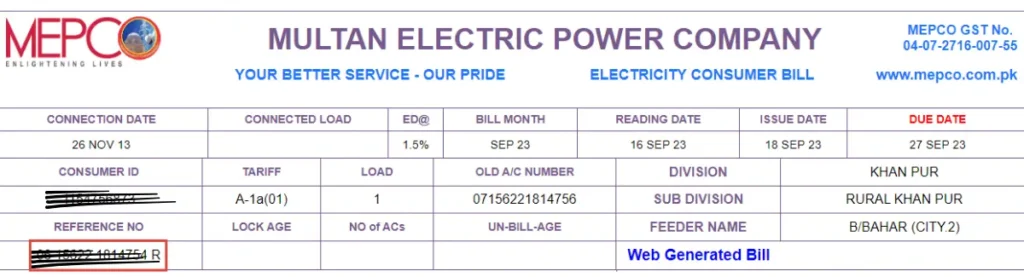
To view your MEPCO bill online, simply enter your reference number in the provided field. If you don’t remember your reference number, you can also use your Customer ID to access your bill details. Once the correct information is entered, your MEPCO electricity bill will be displayed on the screen. If you are unsure where to find your reference number or Customer ID, you can look at the highlighted section in the image below for guidance
About MEPCO
Multan Electric Power Company (MEPCO) is one of the largest electricity distribution companies in Pakistan. It operates under the supervision of the Water and Power Development Authority (WAPDA) and is responsible for supplying electricity to the southern region of Punjab. MEPCO serves millions of consumers, including residential, commercial, agricultural, and industrial users.
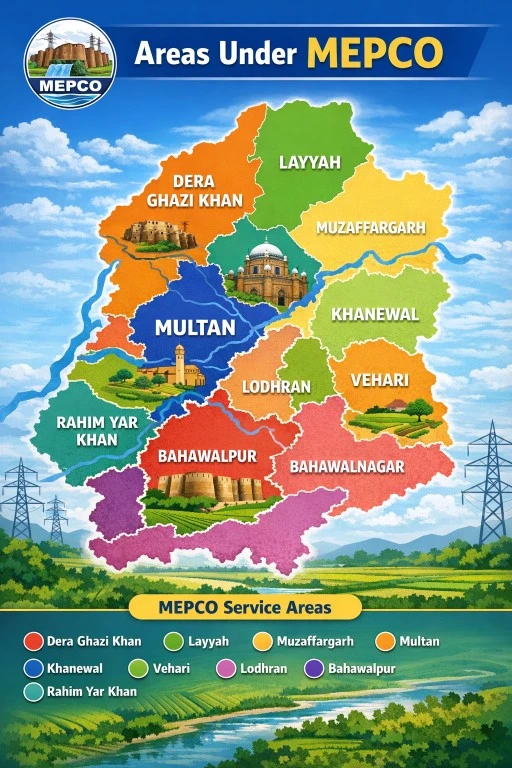
The company covers major cities such as Multan, Bahawalpur, Dera Ghazi Khan, and Rahim Yar Khan. Its main goal is to ensure a reliable and uninterrupted power supply while maintaining an efficient billing system. MEPCO also works on improving infrastructure, reducing electricity losses, and controlling power theft.
In recent years, MEPCO has introduced online services that allow users to check their electricity bills, download duplicate bills, and track payment history easily. These digital facilities have made it more convenient for customers to manage their electricity usage without visiting physical offices.
Overall, MEPCO plays a vital role in the development of South Punjab by providing essential energy services that support daily life and economic activities.
Areas Covered Under MEPCO
How to Check Multan MEPCO Bill Online
Are you trying to check your online Mepco bill for the first time? Do you know the process? Don’t worry, the process for it is very easy; you just have a 14 Digit Mepco reference number to check your MEPCO Bill.
Step 1 – Find Your 14-Digit Reference Number
Step 2– Enter Reference Number in the Bill Portal
Step 3–Print your MEPCO Duplicate Bill and Download for further use
Who to Find Reference Number & Customer ID
To check your Electricity Mepco Bill, you just need your 14-digit reference number. Without this, you cannot see your bijli ka bill. The image below is an example of where to find the Mepco reference number. this on your bill, upper left corner.
Other online Ways to check MEPCO Online Bill
If the MEPCO website isn’t working properly or you’re having trouble checking your bill online, you still have a few easy options to stay updated.
MEPCO SMS Service
You don’t always need the internet to check your bill. By signing up for the MEPCO SMS service, you can receive your monthly bill details straight to your phone. It’s a simple setup, and once you’re subscribed, you’ll get regular updates including the bill amount and due date, without doing anything extra.
MEPCO Online Mobile App
Another handy option is the official MEPCO Mobile App. You can download it from the Play Store or App Store and manage everything in one place. With the app, you can easily:
- View your latest bill
- Check your previous payment history
- Get notifications so you never miss a due date
It’s especially useful if you prefer handling things directly from your phone.
Bill Check Through Banks & Mobile Wallets
You can also check and pay your bill through popular services like Easypaisa, JazzCash, and UPaisa. Many banks in Pakistan offer the same feature through their apps or ATMs. Just enter your reference number to see your bill details and pay it right away.
Phone Number MEPCO Helpline
The MEPCO Helpline Numbers are available 24/7 for customers to register complaints, get billing details, report power outages, and receive quick customer support.
- MEPCO Helpline (24/7): 118
- Toll-Free Number: 0800-63726
- Address: MEPCO Head Office, Khanewal Road, Multan
| Region / City | MEPCO Helpline Number |
|---|---|
| Multan | 061-9220198 |
| Bahawalpur | 062-9250102 |
| Rahim Yar Khan | 068-9230160 |
| Dera Ghazi Khan | 064-9239229 |
| Vehari | 067-3360282 |
| Muzaffargarh | 066-9200065 |
| Sahiwal | 040-9200305 |
| Khanewal | 065-2550026 |
| Lodhran | 0608-360128 |
| Layyah | 0606-413314 |
| Rajanpur | 0604-920092 |
| Pakpattan | 0457-352317 |
| Bahawalnagar | Dear Ghazi Khan |
MEPCO Online Bill Details & Information
When you check your MEPCO bill online, all important details are clearly displayed on your screen. You can easily view the total amount payable for the current month along with the final due date for payment. The bill also shows your meter reading date and the number of electricity units you have consumed.
Just below the total amount, there is an additional section that highlights any late payment surcharge. This extra amount will only apply if you fail to pay your bill before the due date. Moreover, the online system allows you to review your billing history, where you can access records of your electricity bills for the last 12 months. This feature helps users track their usage and manage expenses more effectively.
MEPCO Peak Hours Schedule
MEPCO advises consumers to limit electricity usage during peak hours to reduce load on the system and avoid higher costs. During these specific hours, electricity consumption becomes more expensive, and units are used at a faster rate. By minimizing usage during peak times, consumers can save money and contribute to a stable electricity supply.
Peak Hours by Season:
- December to February: 5 PM – 9 PM
- March to May: 6 PM – 10 PM
- June to August: 7 PM – 11 PM
- September to November: 6 PM – 10 PM
Reducing electricity use during these hours not only lowers your bill but also helps in preventing overloading and power interruptions in your areas.
MEPCO Bill Due Date Extension Policy
Sometimes, due to financial issues or the late delivery of bills, people fail to pay on time. In such situations, MEPCO provides a facility to extend the due date for a limited period.
Extension Criteria
- Up to Rs. 10,000+ Bill: Assistant Manager can allow a 3-day extension
- Above Rs. 25,000: Deputy Manager has authority for 3 extra days
- Above Rs. 2 Lakh: Billing Manager can grant up to 5 days extension
- More than 5 days: Only higher authorities, like CEO, can approve in special cases
MEPCO SMS Notification Service
If you often forget bill deadlines, MEPCO offers an SMS alert service. This helps you stay updated about your bill amount and due date.
How to Activate SMS Alerts
Simply send a message in this format:
pitc <space> reference number
Send it to 8334
After activation, you will receive regular updates directly on your mobile.
New Electricity Connection & Transfer Process
Getting a new connection or transferring an existing one involves a few important steps.
Step-by-Step Procedure
1. Submit Application
You can apply either by visiting a MEPCO office or through the official website.
2. Feasibility Check
MEPCO reviews the technical and financial conditions of your area.
3. Payment of Charges
You will receive a demand notice including connection charges, meter fee, and security deposit.
4. Site Inspection
The team inspects your location to ensure proper installation conditions.
5. Meter Installation
After approval, the meter is installed and connected to the electricity supply.
Once completed, you can start using electricity services.
How to Register and Track MEPCO Complaints
If you notice any issue such as incorrect billing or meter reading problems, you can file a complaint easily.
Complaint Registration Process
- Visit the complaint management system (CCMS)
- Create your account or log in
- Enter your reference number or registered mobile number
- Write your issue clearly in the complaint section
- Submit your request
Track Your Complaint
- Open complaint tracking option
- Enter your reference number
- Click search to view status
Most complaints are acknowledged within 24 hours and resolved within a few days.
MEPCO Bill Installment Facility
If your electricity bill is too high, MEPCO allows you to pay it in installments to reduce financial pressure.
Installment Plans
- Up to Rs. 10,000: 3 installments via Assistant Manager
- Above Rs. 1 Lakh: Approval from Deputy Manager required
- Above Rs. 5 Lakh: Manager Operations can allow 4 installments
- Above Rs. 10 Lakh: The Chief Engineer can approve up to 12 installments
In special cases, higher authorities may also provide flexible solutions.
MEPCO Bill Check – Frequently Asked Questions (FAQs)
1. What is MEPCO Bill Check?
The mepcobillonline.com.pk provides the Check MEPCO Bill Online service. View your bill amount, due date, and download a duplicate MEPCO bill instantly and 100% free.
2. How can I check my MEPCO bill online?
You can check your MEPCO bill online by following these steps:
- Visit a MEPCO bill checking website
- Enter your 14-digit reference number
- Click on the “Check Bill” button
- Your latest bill details will appear instantly
3. Can I check my MEPCO bill without a reference number?
Yes, you can check your bill using your Customer ID if you don’t have the reference number. Both options are available on most online bill checking platforms.
4. Where can I find my MEPCO reference number?
The reference number is printed on the top section of your previous electricity bill. It is a 14-digit number used to identify your connection.
5. Is the MEPCO bill check online free?
Yes, checking your MEPCO bill online is completely free. You don’t need to pay any fee to access your bill details.
6. Can I download or print my MEPCO bill?
Yes, after checking your bill online, you can:
- Download it as a PDF
- Print it for payment or record purposes
7. How can I pay my MEPCO bill online?
You can pay your bill through:
- Mobile banking apps
- Internet banking
- ATMs
- EasyPaisa & JazzCash
These methods make bill payment quick and convenient.
8. What should I do if my MEPCO bill is not showing?
If your bill is not showing:
- Double-check your reference number
- Ensure the internet connection is stable
- Try again after some time
If the issue continues, contact Multan Electric Power Company customer support.
9. Can I check previous MEPCO bills online?
Yes, many websites allow you to check your previous bill history, including due amounts and payment records.
10. Is it safe to check the MEPCO bill online?
Yes, checking your bill online is safe as long as you use a trusted website. Always avoid entering personal data on unknown platforms.
11. What is the due date of an MEPCO bill?
The due date is mentioned on your bill. Make sure to pay before the deadline to avoid late payment surcharges.
12. What happens if I don’t pay my MEPCO bill on time?
If you don’t pay your bill:
- A late payment surcharge will be applied
- Your electricity connection may be disconnected after a certain period
13. Can I check the MEPCO bill by SMS?
Currently, Multan Electric Power Company mainly provides bill checking through online platforms. SMS services may be limited or unavailable.
14. Why is my MEPCO bill amount high?
Your bill may be high due to:
- Increased electricity usage
- Seasonal changes (summer/winter)
- Additional taxes or surcharges
15. How can I reduce my MEPCO electricity bill?
To reduce your bill:
- Use energy-efficient appliances
- Turn off unused devices
- Avoid peak hours of usage
- Install LED lights